教程:博客独立页面调用 Memos 的方法
// 2023.8.22更新
集成
集成到自己的网站,在合适的位置需要放置一个 CSS 选择器作为展示 Memos 的容器。
<div id="memos" class="memos"></div>
<!-- Your Memos API -->
<script type="text/javascript">
        var memos = {
            host: 'https://memos.ee/',  // Your Memos, with '/' end.
            limit: '20',  // Pagination to show.
            creatorId: '1',  // The old instance is 101, and the new instance is 1.
            domId: '#memos',  // Default #memos.
            username: 'jkjoy',  // You can customize the display ID that is not related to memos.
            name: '浪子',  // You can customize the displayed full name, that is not related to memos.
        }

    </script>
引入CSS和JS
<link rel="stylesheet" href="https://blog.chaihu.top/memos/assets/css/memos.css" rel="stylesheet" type="text/css">
<link rel="stylesheet" href="https://blog.chaihu.top/memos/assets/css/custom.css" rel="stylesheet" type="text/css">
<script type="text/javascript" src="https://blog.chaihu.top/memos/assets/js/main.js"></script>
<script type="text/javascript" src="https://blog.chaihu.top/memos/assets/js/custom.js"></script>
<script type="text/javascript" src="https://blog.chaihu.top/memos/assets/js/marked.min.js?v=4.2.2"></script>
<script type="text/javascript" src="https://blog.chaihu.top/memos/assets/js/moment.min.js?v=2.29.4"></script>
<script type="text/javascript" src="https://blog.chaihu.top/memos/assets/js/moment.twitter.js"></script>
<script type="text/javascript" src="https://blog.chaihu.top/memos/assets/js/view-image.min.js"></script>
<script type="text/javascript" src="https://blog.chaihu.top/memos/assets/js/lazyload.min.js?v=17.8.3"></script>
<script type="text/javascript" src="https://blog.chaihu.top/memos/assets/js/highlight.min.js"></script>
独立网页
演示地址
https://blog.chaihu.top/memos/
fork参考项目
修改index.html中
        var memos = {
            host: 'https://memos.ee/',  // Your Memos, with '/' end.
            limit: '20',  // Pagination to show.
            creatorId: '1',  // The old instance is 101, and the new instance is 1.
            domId: '#memos',  // Default #memos.
            username: 'jkjoy',  // You can customize the display ID that is not related to memos.
            name: '浪子',  // You can customize the displayed full name, that is not related to memos.
}其中host creatorId username name的值.
setting github pages
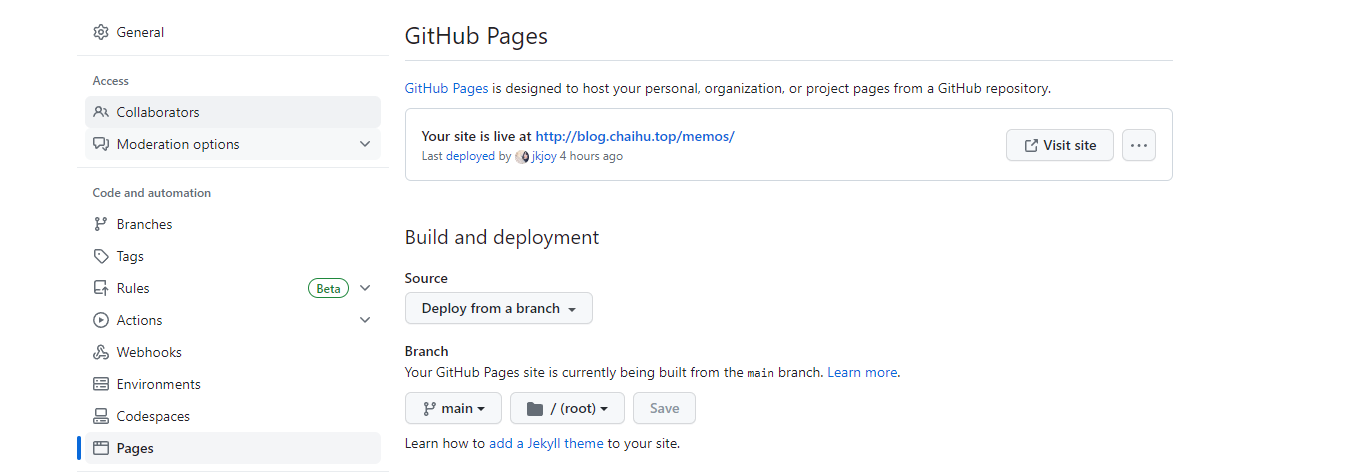
如上图设置即可.
复制链接
https://blog.imsun.org/archives/memos-api-call-rendering-page.html